Protect your data against tampering and loss
Protecting your data and applications against accidental or deliberate tampering and against loss calls for an up-to-date security design. We advise you and implement the solution that fits your requirements.
Depending on the requirements you define, several approaches are available. Combined, they add up to effective protection of your data within agreed SLAs.
- Protecting data against unauthorised access
- Virtual Private Database
- View layer designs that separate application users from object owners
- Protecting data against technical failures
- RMAN backup and recovery
- Standby database with Data Guard
- Business continuity planning (BCP)
- Protecting data against logical errors
- Replication with Oracle Streams
- RMAN backup and recovery
- Standby database with Data Guard and time-delayed apply
Example: hardening the listener
IP whitelisting is a straightforward way to restrict which external systems may reach the
Oracle database and the Oracle listener. The lists are configured in sqlnet.ora.
NAMES.DIRECTORY_PATH= (TNSNAMES, ONAMES, HOSTNAME)

SSL_CLIENT_AUTHENTICATION =FALSE

tcp.validnode_checking = yes
tcp.invited_nodes = (127.0.0.1, 192.168.0.15, 192.168.0.15)

WALLET_LOCATION =
 (SOURCE=
   (METHOD=File)
   (METHOD_DATA=
     (DIRECTORY=/opt/app/oracle/WALLETS/oracle)
   )
 )
With this configuration, only servers with the listed IP addresses can establish a connection to the listener. To avoid errors, specify IP addresses only and do not rely on name resolution. The listener configuration must have TCP as the only enabled protocol.
Example: access from application servers
Access from an application server to the database is a typical case. To make full use of the RAC features and to comply with security policies, the JDBC data source has to be configured correctly. Access goes through a layer design: the data schema is locked, and the privileges the application user needs on the objects are granted through views and synonyms.
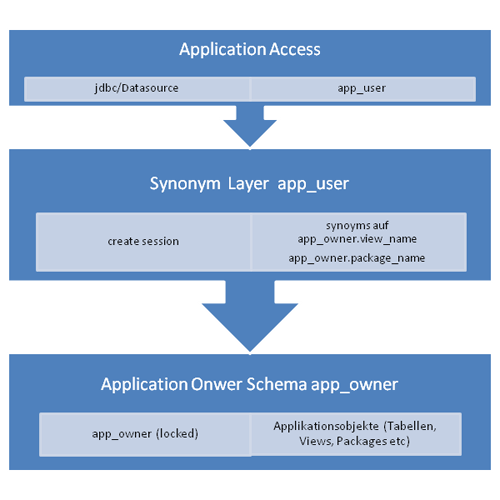
As a result, the application user has no direct access to the objects and cannot modify them. The view concept introduces an additional abstraction layer, so that changes in the schema are encapsulated behind the views. Database changes and application changes can therefore be rolled out independently of one another.
The JDBC data source should address the Oracle instance through service names. A reconnect-capable configuration can look like this:
<?xml version="1.0" encoding="UTF-8"?>
<datasources>
    <local-tx-datasource>
        <jndi-name>jdbc/MyDS_Name</jndi-name>
       <connection-url>jdbc:oracle:thin:@(DESCRIPTION =
    (ADDRESS_LIST =
      (ADDRESS = (PROTOCOL = TCP)(HOST = orarac1-vip)(PORT = 1521))
      (ADDRESS = (PROTOCOL = TCP)(HOST = orarac2-vip)(PORT = 1521))
    )
    (CONNECT_DATA =
      (SERVICE_NAME = MyDS_Name.service)
      (SERVER = DEDICATED)))
        </connection-url>
        <driver-class>oracle.jdbc.driver.OracleDriver</driver-class>
        <user-name>application_user<user-name>
        <password>topsecret<password>
        <set-tx-query-timeout/>
        <query-timeout>30</query-timeout>
        <attribute name='ManagedConnectionFactoryProperties'>
          <properties>
           <config-property name='QueryTimeout' type='int'>30</config-property>
           <config-property name='TransactionQueryTimeout' type='boolean'>true</config-property>
          </properties>
        </attribute>
        <blocking-timeout-millis>5000</blocking-timeout-millis>
        <min-pool-size>0</min-pool-size>
        <max-pool-size>50</max-pool-size>
        <check-valid-connection-sql>select count(1) from dual</check-valid-connection-sql>
        <idle-timeout-minutes>1</idle-timeout-minutes>
    </local-tx-datasource>
</datasources>